Why Your Internet Feels Slow Even After a Fast Speed Test
Published: 9 Jul 2026
Have you ever run a speed test, seen a great result, and then had your video call freeze two minutes later? You’re not imagining things, and you’re definitely not alone. A fast internet speed test result doesn’t always mean smooth, fast internet in every situation. This guide explains exactly why that mismatch happens and what you can actually do about it.
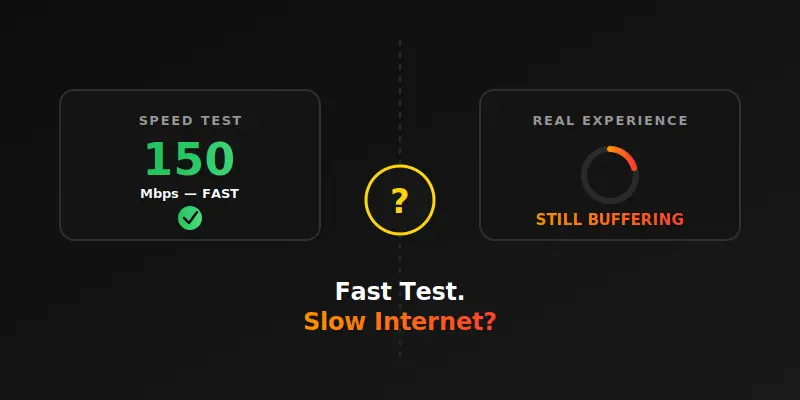
Why Speed Test Numbers Don’t Always Match Real Internet Performance
A speed test is useful, but it only checks one small part of your entire internet experience. This section explains what a speed test actually measures, what it misses, and how to close that gap.
A Speed Test Only Checks One Moment in Time
Your speed test result reflects your connection at that exact second, nothing before or after. Network conditions change constantly throughout the day. That’s why a fast result now doesn’t guarantee the same speed five minutes later.
It Doesn’t Measure Wi-Fi Signal Strength Everywhere
If you test near your router, you’ll likely get a great result. But your bedroom or backyard might have a much weaker signal. Speed tests don’t account for where you’re actually using the internet.
Background Apps Can Quietly Eat Your Bandwidth
Cloud backups, auto-updates, and streaming devices can run silently in the background. These apps use bandwidth even when you’re not actively using them. This can make everyday browsing feel slow, even with a strong speed test result.
The Website or App You’re Using Might Be the Problem
Sometimes the slowness isn’t your internet at all, it’s the website or server you’re trying to reach. If a website’s own server is overloaded, no amount of internet speed will fix that. This is one of the most overlooked reasons for “slow internet.”
Too Many Devices Can Silently Slow Things Down
Every device connected to your network shares the same bandwidth. Smart TVs, phones, and laptops running in the background all take a share. A speed test on one device doesn’t reflect what’s happening across your whole network.
Router Placement Affects Real-World Speed
A router tucked in a closet or behind furniture struggles to send a strong signal. Distance and walls both weaken Wi-Fi performance significantly. This is a common reason people get a fast wired test but slow Wi-Fi in other rooms.
Old Devices Can’t Always Use Your Full Speed
Your internet plan might support high speeds, but an older phone or laptop may not. Outdated Wi-Fi chips inside devices often cap out well below your actual plan speed. This creates a mismatch that has nothing to do with your provider.
Ping and Latency Matter More Than You Think
A fast download speed doesn’t guarantee a smooth experience if your ping is high. Video calls and online games are especially sensitive to latency, not just raw speed. This is often the missing piece when everything “looks fine” but still feels laggy.
Peak Hour Congestion Isn’t Always Visible Instantly
Your provider’s network can get congested during evening peak hours, even if your speed test looks fine. This congestion can happen closer to their servers, not right at your home connection point. It often shows up as inconsistent performance rather than a flat, obvious drop.
VPNs and Security Software Can Slow Things Down
Running a VPN adds an extra step to your connection, which can reduce real-world speed. Antivirus software scanning your traffic can also add small delays. Neither of these show up clearly on a basic speed test.
How to Actually Diagnose the Real Problem
Start by testing on a wired connection to remove Wi-Fi as a factor. Then check how many devices are active and close unnecessary background apps. Finally, test at different times of day to spot patterns tied to peak hours.
When It’s Time to Contact Your Internet Provider
If your wired speed test is consistently far below your plan, even during off-peak hours, it’s worth reaching out to your provider. Share your speed test results directly, since providers often ask for this information first. Consistent, documented low numbers make it much easier to get real support.
Test Your Speed First
Before troubleshooting anything else, it helps to know your exact numbers. Run our free internet speed test online to check your download speed, upload speed, and ping in seconds. Once you have a clear baseline, it becomes much easier to figure out whether the issue is your internet, your device, or something else entirely.
Conclusion
A fast speed test result is a good starting point, but it’s not the whole picture when it comes to why is my internet slow even after a fast speed test. Background apps, device limits, router placement, and even the website you’re visiting can all play a role. My honest recommendation is to start with our free internet speed test online, then work through the causes above one by one. Give it a try today, and check out our other guides for more simple, practical fixes.




- Be Respectful
- Stay Relevant
- Stay Positive
- True Feedback
- Encourage Discussion
- Avoid Spamming
- No Fake News
- Don't Copy-Paste
- No Personal Attacks
- Be Respectful
- Stay Relevant
- Stay Positive
- True Feedback
- Encourage Discussion
- Avoid Spamming
- No Fake News
- Don't Copy-Paste
- No Personal Attacks
